Load the truck on screen before you load it for real.
StowCargo is web-based truck and container load planning software for manufacturers and exporters. It takes the packing list from Excel, a PDF or a photo, finds a place for every box, tells you how many vehicles you need and prepares step-by-step loading instructions for the warehouse.
Individual $4.99 a month, team $9.99 per user a month; 2 months free billed yearly.
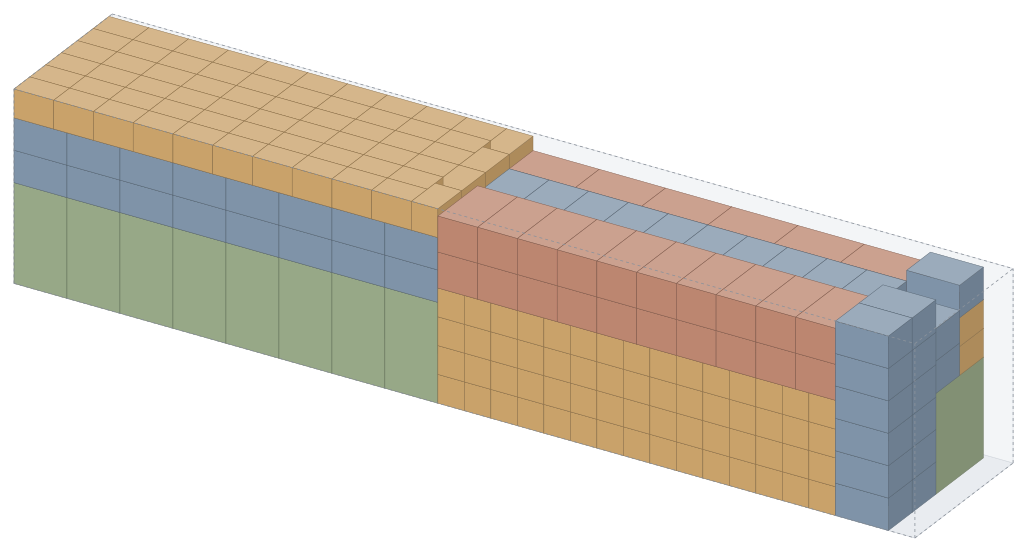
- Volume utilisation
- 91.2%
- Placed
- 414 / 414
- Vehicles
- 1 · Curtainsider 13.60
- Loading length
- 13.20 m
- Weight
- 12,998 kg
1 / 3
Every box gets its place
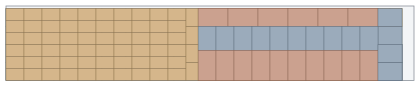
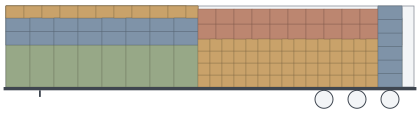
The engine placed 414 items with orientation, base support, weight and axle loads in mind: one Curtainsider 13.60, loading length 13.20 m.
This is not an illustration or a screenshot: the engine actually placed these 414 items for this page. Boxes appear in loading order.
Which vehicle should it go in?
Paste the packing list and the engine actually places the same 450 pieces into every vehicle type. How many vehicles you need and how full each one is come from a calculated plan, not an estimate.
| Product | L | W | H | Qty |
|---|---|---|---|---|
| Bathrobe pallet | 1,200 | 800 | 1,400 | 18 |
| Towel carton | 600 | 400 | 400 | 270 |
| Bedding carton | 800 | 600 | 450 | 108 |
| Blanket bale | 1,000 | 600 | 500 | 54 |
Pasted from Excel, dimensions converted from cm to mm
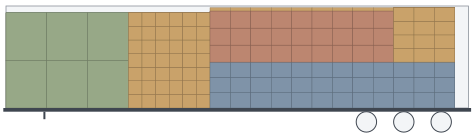
Space first. Rules when you need them.
Space comes first by default: boxes may be stacked and the load is fitted into the shortest length, while orientation and base support are always kept. If you ship fragile goods, switch on the stacking rules and the engine re-places the same load with them.
Average volume utilisation on the BR1–BR7 container benchmark set: 92.6% (our own measurement, 1 s per instance, Oct 2026).
The same 510 pieces, 13.60 curtainsider. Nothing may be stacked on the glass vase cartons; the stacking rules also keep heavy loads off light cartons (at most 6×).
1 truck11.60 m
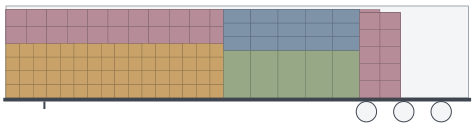
- Glass vase carton(non-stackable)
- Ceramic plate carton
- Towel carton
- Bathrobe pallet
Paper in the office, a phone in the warehouse
The plan becomes a letterheaded report for the customer and the carrier, sequence labels for the cartons and the warehouse team's phone screen, all at once.
- A4 loading report: load list, views, sequence, axle loads, securing
- Sequence labels: boxes are found by number; an outdated label triggers a warning
- Packing list and CMR sheet, Excel, CSV and XML
- Warehouse screen in Turkish, English, German and Russian; a photo of the loaded vehicle at the end
Your ERP sends the packing list and gets the plan back in the same response
StowCargo XML 1.0 and JSON with the same fields. Logo, Netsis, Mikro, SAP or Dynamics can connect, and a signed webhook fires when loading is done. The schema and the OpenAPI definition are public, and it can be installed on your company's own server.
<cekiListesi ref="SIP-2026-0118" ad="Hamburg shipment"> <arac kod="tir-tenteli"/> <kalem ad="Bathrobe pallet" boy="1200" adet="17"/> <kalem ad="Towel carton" boy="600" adet="248"/> <kalem ad="Bedding carton" boy="800" adet="99"/> …</cekiListesi><plan ad="Hamburg shipment" oncelik="bosluk"> <sonuc aracSayisi="1" yerlesen="414"> <yukleme arac="1" hacimDoluluk="0.912" yukBoyu="13200"> <yerlesim sira="1" x="0" y="0" z="0"/> …Everything a load plan needs
Planning
- 3D placement with top, side and door views
- Axle loads, centre of gravity, lateral balance
- Pallets, rolls and drums, multi-stop delivery
- Move and lock boxes by hand
- 16 ready-made vehicles and your own
Warehouse
- Step-by-step loading on a phone
- Find a box by QR code
- Progress and photos reach the office
- Warehouse screen in four languages
Documents
- Letterheaded PDF loading report
- Sequence labels
- Bilingual packing list, CMR sheet
- Excel, CSV, StowCargo XML
Team and company
- Versioned plan archive
- Admin, member, viewer and customer roles
- Activity log and single sign-on (SSO)
- ERP API and signed webhooks
Frequently asked questions
What is StowCargo?
StowCargo is web-based load planning software for trucks and containers. It takes the packing list from Excel, CSV, PDF or a photo; its packing engine places boxes, pallets and cylinders in the vehicle within seconds in the browser and works out how many vehicles you need, the axle loads and the loading sequence. The plan becomes a letterheaded report, sequence labels and a step-by-step loading screen for the warehouse phone, and connects to your ERP over XML and JSON.
Do I need to sign up?
Yes. Planning requires an account and an active subscription; there is no free plan. Warehouse staff loading step by step on a phone need no account: the link the planner sends is enough.
Which vehicles are supported?
There are 16 ready-made vehicles: 13.60 curtainsider, mega and reefer trailers, flatbed, rigid trucks, light truck, panel van and containers: 20' and 40' dry, 40' and 45' High Cube, 20' and 40' open-top, 20' and 40' reefer. You can also add any vehicle by its dimensions and maximum payload.
What formats can the packing list be in?
Excel (.xlsx), CSV, StowCargo XML, PDF and photos, or simply paste the table. Dimensions can be in mm, cm or m, and Turkish or English column headers are recognised.
Where do my documents and data go?
Documents and photos are read on your device and the packing is calculated in your browser. Plans you save go to the archive on the StowCargo server you use. Files are never sent to an outside server on their own.
What about fragile or non-stackable goods?
Mark the item non-stackable, set a load-on-top or layer limit and choose the "Stacking rules" priority. The default "Space first" priority ignores these rules and looks for the shortest loading length.
Does it work on a phone?
Planning is designed for a large screen (computer or tablet). The warehouse team opens the loading link on a phone: they see the next box, where it goes and the progress, and add a photo at the end.
Load your next shipment on screen.
Create your account and pick your plan. The moment you paste your packing list, the engine places the load.