ERP Load Planning Integration: How to Connect Your ERP
How to connect your ERP to load planning with an Excel template, a direct API or a custom integration, plus the item data, fields and project steps you need.
· 11 min read
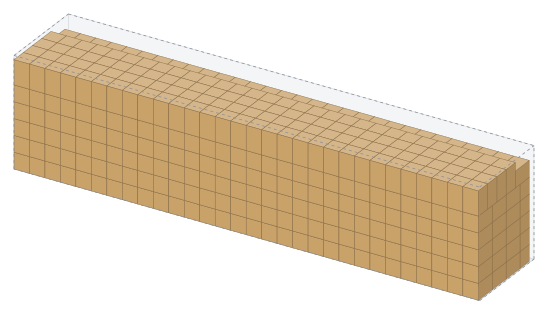
If your orders, delivery notes and item master already live in your ERP, there is no reason to type the same data again just to plan a truck or a container. An ERP load planning integration sends the packing list straight from the ERP to the load planning software and takes the calculated plan back: vehicle count, loading sequence and a link to the plan. This guide covers the three ways to connect, the data your ERP needs to hold, the field list and what a custom integration project involves. For the basics first, see what load planning software does.
Why integrate load planning with your ERP?
Because the data a load plan needs already exists in the ERP, and re-keying it creates errors. Order lines, the consignee, the delivery address and the document number are all created there. Yet in many companies planning happens at a separate desk: someone reads an ERP printout and types the lines into a spreadsheet or a planning tool.
The risk hides in a single wrong digit. Type a carton height of 4 instead of 40 and the plan looks perfect on screen, then the load does not fit at the dock. Skip a line and the truck leaves part-empty or a carton stays behind. If the order changes at the last minute, the planner may never see it, and the warehouse loads to an outdated plan.
An integration addresses all three problems:
- One source of truth: dimensions and quantities come from the item master and the order, so nobody retypes them.
- Speed: the plan is calculated the moment an order is ready to ship, and planners only handle exceptions.
- Traceability: the ERP document number travels with the plan, so you always know which plan belongs to which order.
What are the three ways to connect an ERP to load planning?
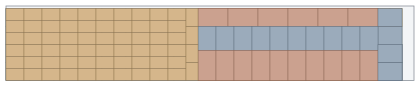
All three lead to the same standard interface: StowCargo XML 1.0, or JSON with the same field names. The right choice depends less on which ERP you run and more on your software resources and how often you ship. The technical reference lives on the ERP integration page.
| Option | Who does the work | Software work | Best for |
|---|---|---|---|
| Excel / CSV export with a template | Your planner | None | Starting today, occasional shipments |
| Direct API connection | Your IT team or ERP partner | On the ERP side | Teams with in-house developers |
| Custom-built integration | StowCargo | None on your side | No developer capacity, or a special flow |
No-code start: an Excel or CSV export
Almost every ERP can export an order or delivery note to Excel or CSV. Drop the file into the workspace, map the columns (length, width, height, quantity, weight) once and save the mapping as a template. Later files import with one click, and on team plans the template is shared. It is not a true integration, but it ends re-keying and surfaces data gaps early.
Direct API connection with your own team
Your IT team or ERP partner converts order lines to XML or JSON and posts them to the ERP API. The public OpenAPI 3.1 definition loads straight into Postman, Swagger UI or API management tools such as SAP Integration Suite and Azure API Management, and client code can be generated from it. A sample packing list in XML and the XSD schema give developers a starting point. Many ERP installations can send XML or JSON over HTTP; the real work is a small connector that joins order lines with the dimensions on the item master.
One detail for international teams: field names are Turkish (boy = length, en = width, yukseklik = height, adet = quantity, agirlik = weight), but XML imports also recognize common English names such as Length, Width, Height, Weight and Quantity. Error messages come back in English when the request sends Accept-Language: en, and dimensions can be sent in inches and weights in pounds.
Custom integration built for your ERP
If nobody on your team has time for it, StowCargo builds the integration. SAP, Microsoft Dynamics, Oracle, Turkish ERPs such as Logo, Netsis and Mikro, or a system built in-house: the connector joins order and delivery lines with the dimensions and weights on your item master, the fields are mapped, test submissions verify the result, and the integration goes live.
How does the integration flow work, step by step?
One request, one response. The ERP does not need to poll while it waits.
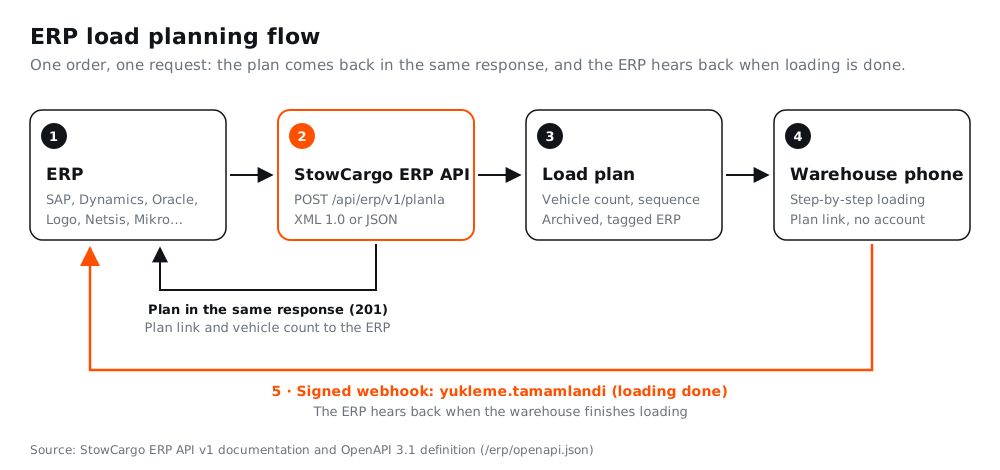
- The order is ready to ship. The ERP sends the packing list as XML or JSON in a POST request to /api/erp/v1/planla. A key created by the company admin goes in an Authorization: Bearer header.
- The plan comes back in the same response. The engine places the load; the response holds the vehicle count, utilization, loading length and each box's position in loading order. It typically arrives within 2 to 3 seconds.
- The ERP stores the result. The plan link and vehicle count are written to the order in the ERP. The plan also lands in the online archive tagged ERP, where planners can open and adjust it.
- The warehouse loads from a phone. The crew opens the plan link on a phone and loads box by box. The link needs no account and runs in English, Turkish, German and Russian; see phone-based warehouse loading.
- The ERP is notified. When every vehicle in the plan is loaded, a signed yukleme.tamamlandi ("loading completed") webhook goes to the address you configured. The ERP can then fetch the latest plan and loading status with GET /api/erp/v1/planlar/{id}.
If the order changes later, the ERP sends it again with the same document number (ref). No duplicate plan is created; a new version is added to the same plan, and the planSurumu field in the response shows the version number.
What data does your ERP need to hold?
The most common blocker in integration projects is missing item master data, not software. A plan is only as accurate as the dimensions it receives. For every product you ship, the ERP needs three things:
- Carton dimensions: the outer size of the shipping carton or pallet, not the product itself. In many installations the item master only holds product dimensions, or the fields were never filled in.
- Weight: the gross weight of the carton or pallet. Payload and axle load checks depend on it.
- Units per carton: orders are often entered in pieces, meters or kilograms. To know how many cartons will ship, you need units per carton, and you should decide early how a partial carton is handled.
A practical way to close the gaps: list the products shipped in the last few months and have the warehouse measure any with empty dimension fields. To sanity-check the numbers, enter a few lines in the free load calculator and compare the result with a real load.
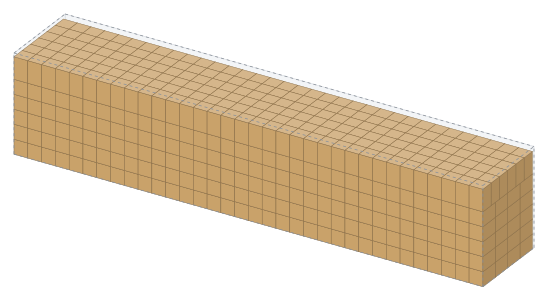
Small errors add up quickly. According to the StowCargo engine, 884 cartons of 600 × 400 × 400 mm fit in a 13.6 m curtainsider trailer on dimensions alone, with carton volume filling 93.2% of the trailer. If the carton size on the item master is off by a few centimeters, that count is off too.
Which fields go into the packing list?
The minimum for a line is its size and quantity; everything else enriches the plan. Field names are identical in XML and JSON.
| Field | Status | Purpose |
|---|---|---|
| boy, en, yukseklik | Required | Length, width and height of the carton or pallet; the unit is set once per document (mm, cm, m or inches) |
| adet | Required | Number of cartons or pallets |
| agirlik | Recommended | Unit weight (kg or lb) for payload and axle checks |
| ad, kod | Recommended | Product name and item code, shown on the report, labels and warehouse screen |
| siparis, durak | Optional | Order number keeps lines together; the delivery stop sets the loading sequence |
| istiflenebilir, ustYuk, yon | Optional | Stackable or not, maximum load on top, keep upright |
| ref | Optional | ERP document number; if it arrives again, it becomes a new version of the same plan |
The vehicle is sent either as a ready-made code (for example tir-tenteli or 40hc) or with its internal dimensions, and GET /api/erp/v1/araclar returns the current codes. Under the default "space first" priority, stacking rules are not applied; istiflenebilir and ustYuk take effect when the "rules" priority is selected. Orientation is always respected.
What should you check when choosing a load planning API?
Look for a documented interface, versioning that survives order changes, secure notifications and clarity about where the data lives. These criteria apply whichever product you pick:
- Machine-readable definition: an OpenAPI or XSD definition shortens the ERP-side work. In StowCargo both can be downloaded without a key.
- Versioning by document number: a changed order should not produce a duplicate plan. The same ref should update the same plan.
- Signed webhooks: each notification is signed with HMAC-SHA256 over the timestamp and the raw body (X-StowCargo-Imza header). Reject signatures older than 5 minutes, and de-duplicate with X-StowCargo-Teslim, since the same notification can arrive twice. Failed deliveries are retried after 1 min, 5 min, 30 min, 2 h and 6 h.
- Data separation: ERP keys and request logs live in a database separate from the site data, and an on-premises installation is available.
- Limits: up to 8 MB and 5,000 lines per request, 120 requests per minute per key and at most 2 concurrent plans per company. Design batch jobs on the ERP side around these.
- Visibility: every request appears in a request log on the site with time, document number, result and duration, so debugging does not have to start in the ERP logs.
What does a custom integration project involve?
When StowCargo builds the integration, the work runs in four steps:
- Discovery: agree on the ERP, the shipping process and the document the plan starts from (sales order, delivery note or shipping order).
- Data: check that shipped products have carton dimensions, weight and units per carton on the item master, and list the gaps.
- Mapping and connector: map ERP fields to StowCargo fields, then set up the submission and the write-back of the plan link, vehicle count and loading status.
- Testing and go-live: run test submissions with real orders, compare the results with what the warehouse actually loads, then go live.
Step two usually sets the timeline. With a complete item master, mapping is quick; with gaps, measuring comes first.
Which plan includes ERP integration?
The ERP API and webhooks are part of the Business plan, at $29.99 per user per month excluding tax. Yearly billing costs 10 months' price, and a yearly Business plan adds one extra month plus free ERP integration onboarding. Larger flows, such as several warehouses, special approval steps or extra fields written back to the ERP, are quoted separately, and a one-time on-premises license is also available.
Conclusion
An ERP integration ends double entry and ties every load plan to its order. Start today with an Excel template, connect the API with your own team, or have the integration built for your ERP. Whichever route you take, the first job is the same: complete the carton dimensions, weights and units per carton on your item master.
Compare the plans and the onboarding included with yearly Business billing on the pricing page.