Load Planning Software: What It Does and How to Choose
Load planning software places every carton inside the vehicle's real internal dimensions; a spreadsheet divides volume. See the gap in a worked example and take a buyer checklist into your next demo.
· 12 min read
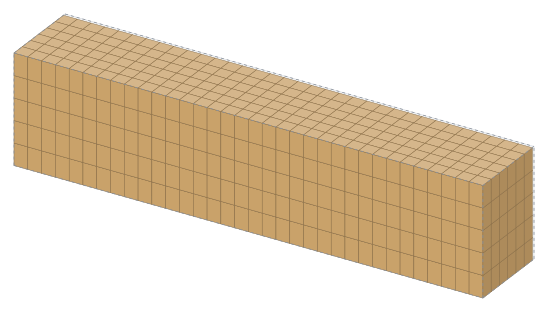
Load planning software takes the cartons, pallets and other pieces on your packing list and places them one by one inside the internal dimensions of the truck or container you choose. It tells you how many vehicles you need, where each piece goes and in what order to load it. Whether you call it truck load planning software, container loading software or simply a load planner, it answers one question: “How many vehicles does this shipment need, and how should it be stacked?”
This guide compares it with a spreadsheet estimate in a worked example, then covers the criteria to check before you buy and a one-table buyer checklist. For internal dimensions only, see the truck and container size guide.
What does load planning software do?
In short, it reads the packing list, fits the load into the vehicle and turns the result into documents the office and the warehouse can use. Good software does this in seconds and applies the same rules every time, so plan quality no longer depends on how focused the planner happens to be that day.
The usual workflow has four steps:
- Import the packing list. Dimensions, quantities, weights and handling rules such as “do not stack” or “this way up” come in from Excel, CSV, PDF or your ERP.
- Pick the vehicle. A 13.60 m curtainsider, a mega trailer, a rigid truck or a 20' or 40' container, or your own vehicle entered by its dimensions.
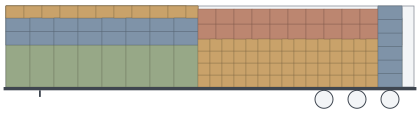
- Let the engine place the load. The packing engine finds a position for each piece, checks payload and weight distribution, and moves whatever doesn't fit to the next vehicle.
- Share the result. You get a 3D plan, a loading report, sequence labels and step-by-step loading instructions for the warehouse.
The real value shows up at decision time. Before you book transport, you know how many vehicles you need, which vehicle type gets the job done with fewer units and how much space is left in the last one.
How is it different from planning in a spreadsheet?
A spreadsheet usually divides volume or floor area. It has no idea how boxes line up across the width and height of the vehicle, so the answer is either too optimistic (the load “fits” until cartons are left on the dock) or, once a safety margin is added, too pessimistic (you book more trucks than you need). The example below runs the same data through both approaches. Every placement figure in this article comes from the StowCargo packing engine (calculated on 27 October 2026, dimensions only).
Worked example: 900 cartons, one curtainsider
Say you have 900 cartons of 600 × 400 × 400 mm that may be turned in any direction. A 13.60 m curtainsider has internal dimensions of 13,600 × 2,480 × 2,700 mm, about 91.07 m³. One carton is 0.096 m³.
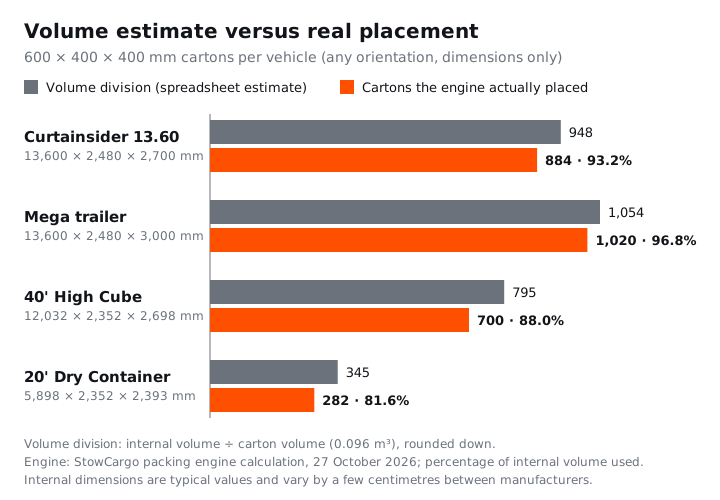
- Spreadsheet estimate: 91.07 ÷ 0.096 = 948 cartons. The sheet says all 900 fit comfortably.
- Real placement: An engine that places each carton fits at most 884 in the same trailer, or 93.2% of its internal volume. Sixteen cartons stay on the dock.
- The right call: Book a second vehicle or choose a taller one. A mega trailer, with 3,000 mm of internal height, takes 1,020 of these cartons, so the shipment goes in one vehicle.
The gap looks small on paper and large on shipping day, when you are finding transport for 16 cartons while the truck waits at the door.
Floor area misleads with pallets too
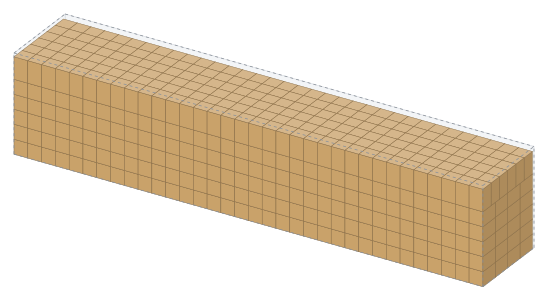
For pallets, spreadsheets tend to divide floor area. The curtainsider floor is 13.60 × 2.48 = 33.73 m², and an industrial pallet (1,200 × 1,000 mm) covers 1.2 m², so division suggests 28 pallets. In reality 26 fit in a single layer: two pallets side by side take 2,400 mm and the remaining 80 mm is useless, while the trailer length splits into 13 rows of 1,000 mm with 600 mm left over that no pallet can use.
With Euro pallets (1,200 × 800 mm) the same trailer takes 34 in a single layer, which equals 13.6 loading metres (LDM). The formula is explained in our guide to loading metres (LDM), and the per-vehicle counts are in how many pallets fit in a truck.
Containers widen the gap
Container internal dimensions line up less neatly with common carton sizes, so the difference between volume division and real placement grows. A 20' dry container holds roughly 33.20 m³ inside. Volume division suggests 345 cartons; the engine places 282 of the same carton (81.6%). In a 40' High Cube the figures are 795 by volume and 700 in reality (88.0%). The missing cartons are the thin strips along the walls and ceiling that no carton orientation can fill.
Spreadsheets still have a place: for a single pallet type, an LDM figure is enough for a rough freight quote. They fall short with mixed lists, stacking rules and axle loads. For a single product, try the free load calculator, no account needed.
What should you look for when choosing load planning software?
The criterion that matters most is how many vehicles and how many metres of loading length the software produces for your own loads. The rest decide how easily the plan reaches the warehouse, the customer and your ERP. Established tools such as EasyCargo, Goodloading, Cargo-Planner and CubeMaster are on the market; the criteria below apply the same way to whichever you evaluate.
Engine quality and measurable utilisation
“High utilisation” on a sales page proves nothing; you need numbers you can check. Ask for results on a public benchmark such as the BR1–BR7 container loading test set, then run a few recent packing lists and compare the suggested vehicle count and loading length with what you actually used. Time it too: planners rerun lists several times a day.
Vehicle library and internal dimensions
Plans run on internal dimensions. Under ISO 668 a 20' container is 6,058 mm long outside, while a typical internal length is 5,898 mm. Ready-made vehicles should show internal size and payload, and you should be able to add your own; internal sizes vary by a few centimetres between manufacturers. The shipping container dimensions guide lists common sizes.
Packing list import
Most planning time goes into data entry, not calculation. The software should read Excel and CSV directly, recognise column headers and never confuse centimetres with millimetres. Reading customer PDFs and photos without retyping also removes typing errors.
Stacking, orientation and fragile-goods rules
“Do not stack”, “this way up”, layer limits and “no heavy on light” should be settable per product. Every rule costs space, so good software lets you plan the same load with and without rules and see the cost in vehicles and loading length.
Axle loads and weight distribution
A total weight under the payload limit does not mean every axle is within its limit. Heavy pallets bunched at the front load the tractor's axles; weight at the rear loads the trailer axles. Look for load per axle, centre of gravity, lateral balance and a warning when a limit is exceeded.
3D views and reports
The 3D view is for checking; the real work happens in the document you share. A loading report should include the load list, top and side views, the loading sequence, axle loads and securing notes, clear enough for a carrier or customer to follow.
Step-by-step warehouse loading
If the plan never reaches the forklift driver, the office calculation is wasted. A phone link should show the next box and where it goes, sequence labels should make it easy to find, and the screen should speak your team's language. See step-by-step warehouse loading.
ERP integration
If orders and packing lists already live in your ERP, copying them by hand costs time and introduces errors. Look for a documented API with a public schema, XML or JSON, and a webhook that tells the ERP when loading is done. Settle early on who builds the connection. Options are covered in ERP load planning integration.
Data privacy and deployment
Packing lists carry customer names, products and order details. Ask where documents are processed (on your device, on the vendor's server or by a third-party service), where plans are stored and whether the software can run on your company's own server if needed.
Pricing model and language
A monthly price alone can mislead. Compare per-user and per-plan pricing, whether view-only users are charged, the annual discount and on-premise licensing. For exporters, language matters too: an interface your planners read comfortably and English documents for foreign customers and carriers.
Buyer checklist
Take this table into your next vendor call. Each row is a question you can test with your own data during the demo.
| Criterion | Ask the vendor |
|---|---|
| Engine and utilisation | How many vehicles and metres of loading length do my own packing lists produce? Do you publish results on a public benchmark? |
| Speed | How many seconds does a large list take? |
| Vehicles | Do ready-made vehicles show internal size and payload? Can I add my own? |
| Import | Does it read Excel, CSV, PDF and photos? Does it recognise units and column headers? |
| Rules | Can I set do-not-stack, orientation and layer limits per product? Can I see what a rule costs in space? |
| Weight | Are axle loads, centre of gravity and lateral balance calculated? |
| Documents | Are the report, labels and packing list good enough to hand to a customer? |
| Warehouse | Can warehouse staff load step by step on a phone without an account? |
| ERP | Is the API documented, with XML and JSON? Who builds the integration? |
| Privacy | Where are documents processed and plans stored? Is an on-premise install possible? |
| Price | Who counts as a paid user? What annual and licence options exist? |
| Language | Which languages do the interface, reports and warehouse screen support? |
How does StowCargo meet these criteria?
Here is the same checklist filled in for our own product, using verified facts only. We still recommend making the decision with your own packing lists.
- Engine: Written in Rust and compiled to WebAssembly, the engine runs in your browser and returns a plan in seconds. On the public BR1–BR7 container loading test set its average volume utilisation is about 92.6% (our own measurement, 1 s per instance, October 2026). The default priority is making the best use of space; switch on the stacking rules when you ship fragile goods.
- Vehicles: Curtainsider, mega, reefer and flatbed trailers, rigid trucks, a light truck, a panel van and 20', 40' and 45' containers (dry, High Cube, open-top, reefer), each with internal dimensions and payload, plus your own vehicles.
- Import: Excel, CSV, StowCargo XML, PDF and photos. Text in PDFs and photos is read on your device.
- Weight: Axle loads, centre of gravity and securing suggestions are part of the plan and the report.
- Documents: An A4 loading report, QR sequence labels and Excel, CSV and XML export.
- Warehouse: Step-by-step loading through a phone link that needs no account, in English, Turkish, German or Russian.
- ERP: The Business plan includes an API with StowCargo XML 1.0 and JSON, an OpenAPI 3.1 definition and signed webhooks. If you prefer, we build the integration for Logo, Netsis, Mikro, SAP, Microsoft Dynamics, Oracle or in-house software; onboarding is free with a yearly Business plan, and larger custom flows are quoted. Details are on the ERP integration page.
- Privacy: Packing runs in the browser and documents are read on the device; plans you save go to the archive on the server. With an on-premise licence the software runs on your company's own server.
- Price: Individual $4.99 a month; Team $9.99 per user a month (from 2 users); Business $29.99 per user a month. Yearly billing gives 2 months free. On-premise is a one-time $1,499 licence. Prices exclude tax; there is no free plan or trial.
- Language: The interface and reports are in English and Turkish.
One known limit, stated plainly: planning is designed for a large screen (a computer or tablet); on phones, the warehouse loading screen is what runs.
Conclusion
Load planning software accounts for the geometry a spreadsheet's volume division cannot see. Even with a single carton size the gap is 64 cartons in a curtainsider and 63 in a 20' container. When you choose, trust the vehicle count and loading length from your own packing lists, then use the checklist to judge how the plan reaches the warehouse, the customer and your ERP.
As a first step, enter your most common carton or pallet in the free load calculator and compare the result with your current spreadsheet estimate. For mixed loads, axle checks and warehouse instructions, see the plans and pricing.