Excel vs Load Planning Software: Where the Formula Fails
Summing carton volume and dividing by trailer volume gives a quick estimate, not a load plan. Copyable formulas plus three lists measured with a packing engine: where Excel is right, optimistic and pessimistic.
· 8 min read
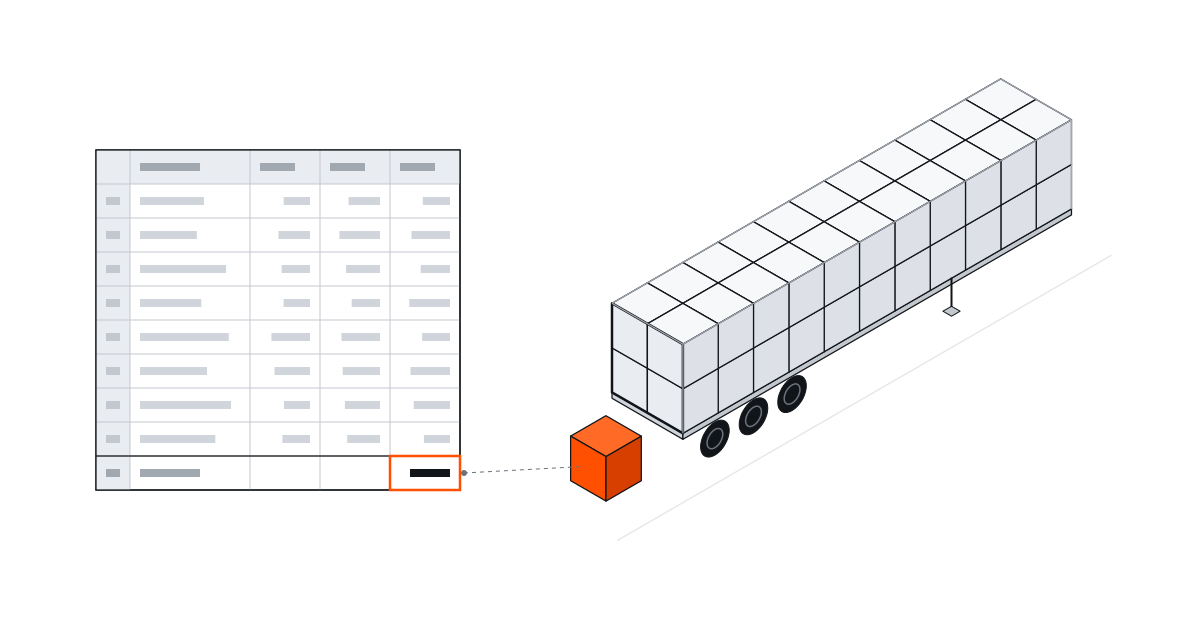
The usual Excel load plan sums the volume of all cartons and divides it by the trailer's internal volume. That is a fair first estimate for a quote, but it does not tell you how many cartons actually fit. 840 cartons of 600 × 400 × 400 mm take up 88.6% of a curtainsider's volume, yet if they must stay upright only 816 fit and you need a second truck.
Below we build the formulas step by step so you can copy them, then run the same lists through a packing engine to show where Excel is right, where it is optimistic and where it is pessimistic.
Step by step: volume and weight in Excel
Example: one line, 840 cartons of 600 × 400 × 400 mm at 9.5 kg each, in a 13.6 m curtainsider. One product per row, dimensions in millimetres.
| Column | Header | Row 2 | Formula |
|---|---|---|---|
| A | Product | Carton 600 × 400 × 400 | |
| B | Length (mm) | 600 | |
| C | Width (mm) | 400 | |
| D | Height (mm) | 400 | |
| E | Quantity | 840 | |
| F | Carton weight (kg) | 9.5 | |
| G | Unit volume (m³) | 0.096 | =B2 * C2 * D2 / 1000000000 |
| H | Total volume (m³) | 80.64 | =G2 * E2 |
| I | Total weight (kg) | 7,980 | =E2 * F2 |
Then the vehicle cells. The curtainsider planning size is 13,600 × 2,480 × 2,700 mm with a 24,000 kg payload (real trailers vary by a few centimetres between builders; see the curtainsider page):
| Cell | What | Formula | Result |
|---|---|---|---|
| K2 | Trailer volume (m³) | =13.6 * 2.48 * 2.7 | 91.07 |
| K3 | Volume ratio | =SUM(H:H) / K2 | 88.6% |
| K4 | Trucks by volume | =ROUNDUP(SUM(H:H) / K2, 0) | 1 |
| K5 | Trucks by weight | =ROUNDUP(SUM(I:I) / 24000, 0) | 1 |
ROUNDUP takes 0.886 trucks to 1. In some regional settings Excel expects a semicolon instead of a comma between arguments. Excel's answer: one truck. The engine's answer, with cartons kept upright: two trucks, the second carrying 0.4 m (24 cartons).
A better formula: rows and layers
The volume formula treats cartons like a liquid. For a single carton size you can go one step further and count how many rows and layers fit. Use ROUNDDOWN to drop the fraction, because half a carton does not ship:
| Orientation | Formula | For a 600 × 400 × 400 carton |
|---|---|---|
| Length along the trailer | =ROUNDDOWN(13600 / B2, 0) * ROUNDDOWN(2480 / C2, 0) * ROUNDDOWN(2700 / D2, 0) | 22 × 6 × 6 = 792 |
| Length across the trailer | =ROUNDDOWN(13600 / C2, 0) * ROUNDDOWN(2480 / B2, 0) * ROUNDDOWN(2700 / D2, 0) | 34 × 4 × 6 = 816 |
The larger of the two is 816, and the engine also placed exactly 816 upright cartons. For one size, one orientation and a load built in even layers, this grid formula is right, and it tells you 840 will not fit where the volume formula said it would. Check weight separately: 7,980 kg is well under 24,000 kg.
Where the grid formula is too pessimistic
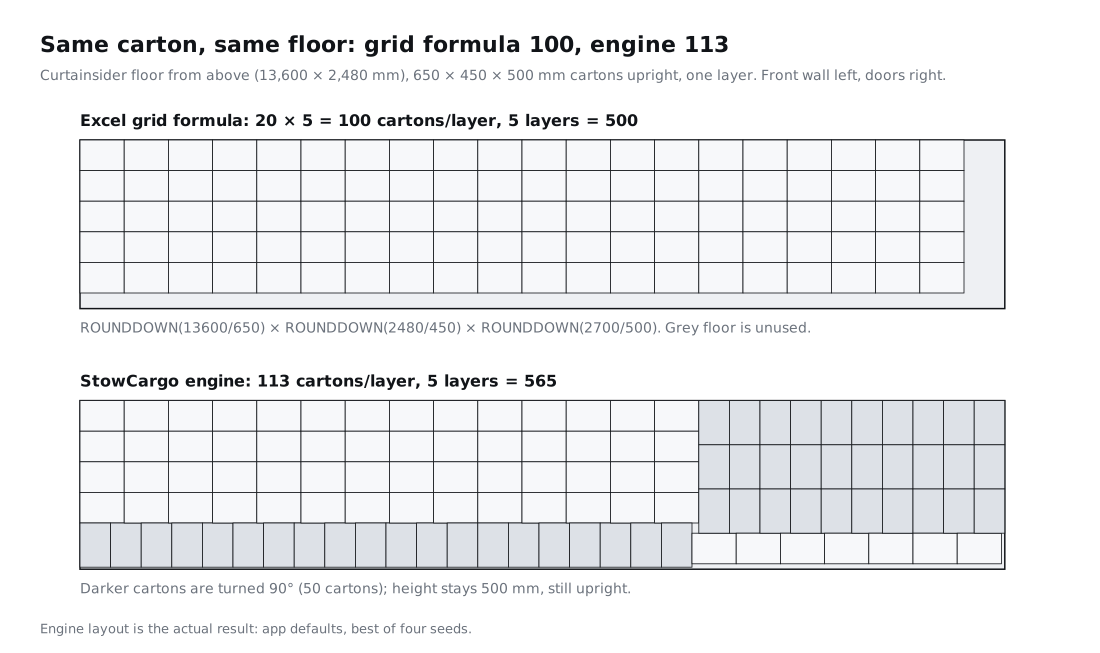
Apply the same formula to a 650 × 450 × 500 mm carton: 13,600 / 650 gives 20 rows, 2,480 / 450 gives 5, 2,700 / 500 gives 5 layers. That is 100 per layer and 500 in total; the other orientation gives 30 × 3 × 5 = 450. By the spreadsheet, 520 cartons do not fit.
The engine put all 520 in one truck at 12.6 m. In a capacity run it reached 113 per layer, 565 over five layers, by turning part of the floor 90° to use the 230 mm left over across the trailer width. No single formula captures that: which rows to turn depends on the space that remains.
Free orientation makes the gap bigger. If a 600 × 400 × 400 mm carton may be turned, writing the grid formula for all six orientations still tops out at 816; the engine fitted 884 by standing one layer on the 600 mm edge. In a 40 ft high cube the best of six orientations is 600 cartons and the engine placed 700.
Three lists, three outcomes
We ran the volume formula, the grid formula and the engine on the same lists. Engine results come from the StowCargo packing engine with the app's default settings, best of four random seeds.
| List | Volume ratio | Volume formula | Grid formula | Engine |
|---|---|---|---|---|
| 520 cartons 650 × 450 × 500, upright, curtainsider | 83.5% | 1 truck | 500 fit: 2 trucks | 1 truck, 12.6 m |
| 840 cartons 600 × 400 × 400, upright, curtainsider | 88.6% | 1 truck | 816 fit: 2 trucks | 2 trucks, 0.4 m in the second |
| Same 840, any orientation | 88.6% | 1 truck | 816 fit: 2 trucks | 1 truck, 13.0 m |
| Same 840, upright, mega trailer | 79.7% | 1 truck | 952 fit: 1 truck | 1 truck, 12.0 m |
| 1,377 cartons in 6 sizes, upright, curtainsider | 110.4% | 2 trucks | cannot be written | 2 trucks, 2.1 m in the second |
| Same list, mega trailer | 99.4% | 1 truck | cannot be written | 2 trucks, 0.6 m in the second |
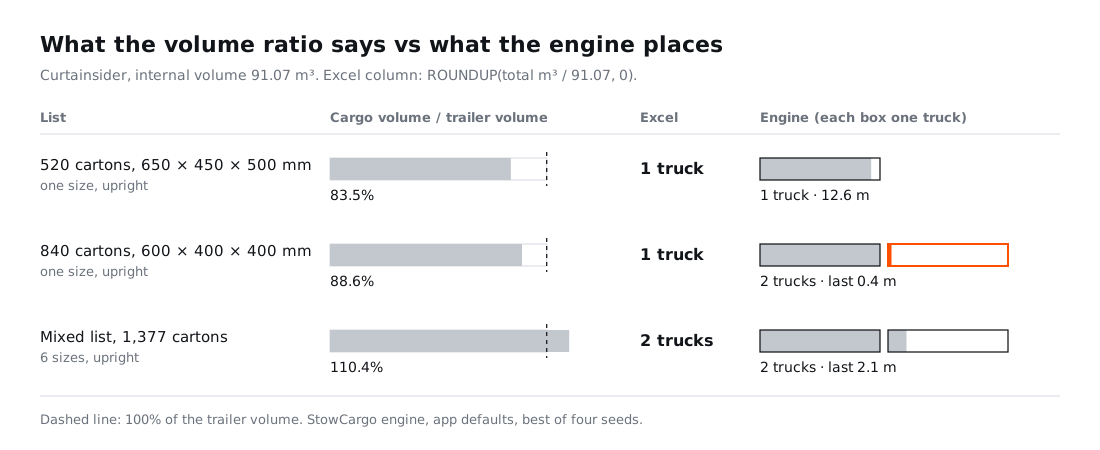
The short reading: the volume formula is optimistic, the grid formula is often pessimistic for a single carton size, and when the two agree they are probably right. For a mixed list there is no grid formula at all. The volume formula gets "2 trucks" right for the 110.4% list but cannot tell you that the second truck holds only 2.1 m, which is exactly the number you need to decide whether to ship that part as a groupage load instead.
There is also no safe "fits below X% of volume" rule. In the same curtainsider, upright 600 × 400 × 400 mm cartons topped out at 86.0% while 650 × 450 × 500 mm cartons with free orientation reached 98.4%. A fixed margin wastes a truck on one load and overflows on another.
Do not skip the weight column
With light cartons volume runs out first; with heavy cargo it is the other way round, and this is where a spreadsheet is most reliable. Loading 220-litre steel drums upright (Ø585 × 880 mm, 210 kg), the engine put 114 in a curtainsider and the load stopped at 5.85 m: the trailer was full by weight (114 × 210 = 23,940 kg). A 40 ft high cube took 126 of the same drum (26,460 kg against a 26,500 kg payload).
One formula gives you that in Excel: =ROUNDDOWN(24000 / F2, 0) returns 114 for a 210 kg drum, the same as the engine. So keep a weight column and a trucks-by-weight cell in every template; it is what tells you a trailer showing 37.7% by volume is in fact full. How that weight spreads across the axles is a separate check, covered below.
Where Excel is good enough
- One carton size, one vehicle, no rules. Volume formula plus grid formula plus a weight check gives a dependable rough truck count.
- Quoting. When a customer asks how many trucks an order needs, it gives a range in minutes.
- Repeat shipments. Once you have seen how many cartons really fit, hard-coding that number in the sheet works.
Where Excel breaks down
- Mixed sizes. You cannot write a formula for how six carton sizes interlock. More in mixed carton loading.
- Stacking rules. One "no load on top" line moved a measured list from 1 truck to 2; the volume formula returns the same number either way. See how to increase truck load utilization.
- Palletising. 3,000 cartons took 4 trucks floor-loaded and 6 on Euro pallets, at the same cargo volume.
- Drop order. The same list measured 9.5 m with one drop and 10.0 m with three.
- Weight distribution. A total under 24,000 kg says nothing about individual axles: axle load calculation.
- A plan the warehouse can follow. Excel returns a number, not which carton goes where. For step-by-step loading on a phone, see warehouse loading.
Turning the spreadsheet into a plan
Moving to software does not mean dropping Excel. If your packing list already lives in a spreadsheet, you can upload the file to StowCargo or copy the cells and paste them in. The columns the list needs are covered in how to prepare a packing list. For one carton or pallet size, the free load calculator gives the engine's version of the grid calculation above without an account. Mixed lists are planned in the workspace; plans are on the pricing page.